 Sentinel
Windows desktop
See the proposal.
Approve the next move.
Choose an open window, describe a task, and review each proposed input. Single-step mode is on by default.
Explore the workflow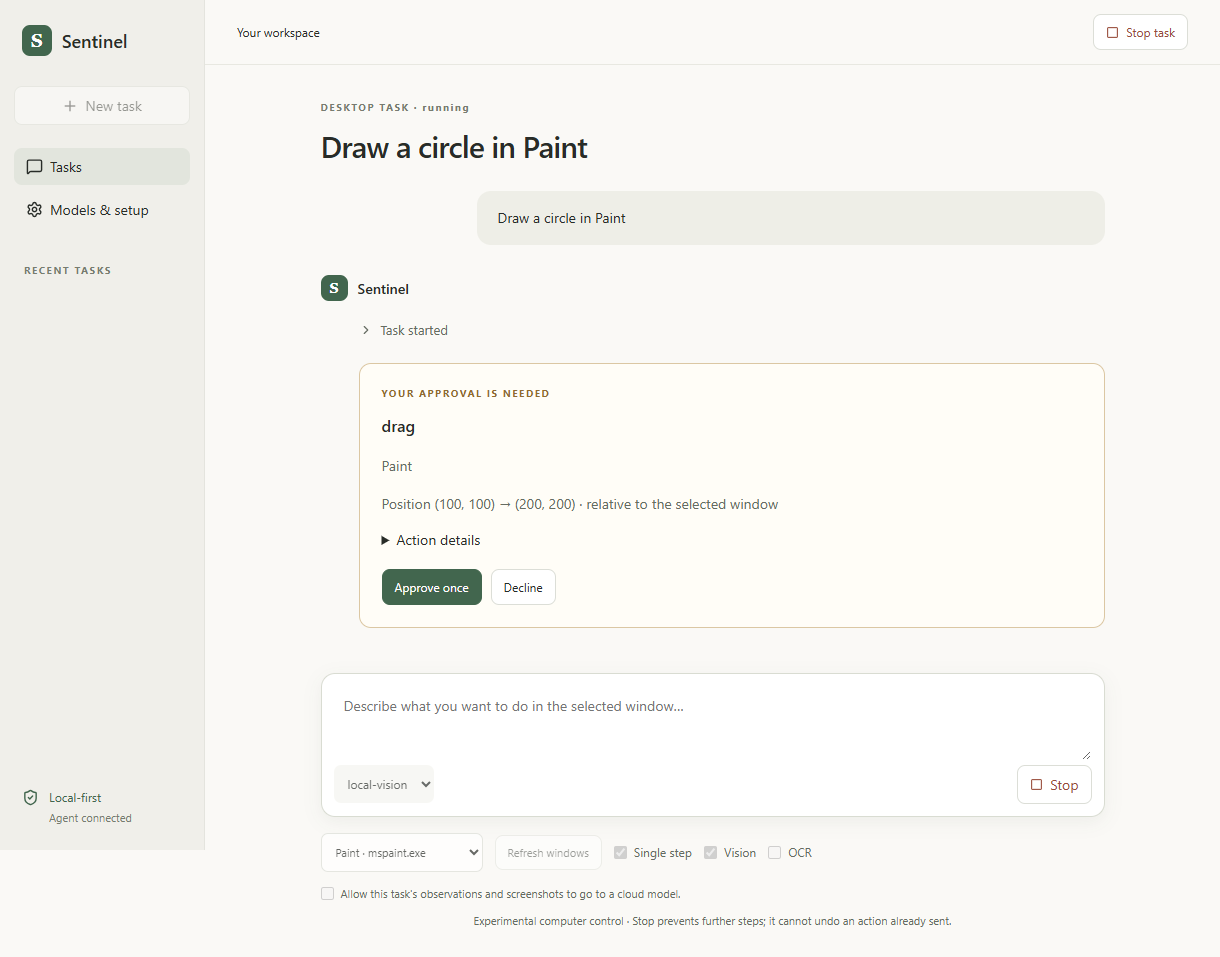
Local-first computer use
An AI agent that observes your screen, proposes actions, and asks before it acts.

Run locallyBring a model that fits your machine.
Review the actionKeep the next step in your hands.
Inspect the codeFollow the implementation on GitHub.
From a terminal agent to a portable desktop app. Built to make the boundaries visible, not hide them.
Windows desktop
Choose an open window, describe a task, and review each proposed input. Single-step mode is on by default.
Explore the workflow
Terminal workflows
The CLI includes allowlisted app launching, browser tasks, and direct Word, Excel and PDF workflows.
sentinel-agent "Open Chrome,
open YouTube, and search
hello world" --no-model
--live-desktop
Illustrative instruction. Keep it on one line in your terminal. Availability depends on installed apps and workflow dependencies.
Portable Windows app
The desktop build bundles Python. Move the executable and its
SentinelData folder together.

Ollama, model weights and optional Tesseract are installed separately.
The control loop
Explore how an instruction becomes a reviewed action. This walkthrough is illustrative and never controls your computer.
Accessibility data identifies available controls. A vision model can also receive a window-only screenshot, with optional local OCR.
Observation
  source       selected window
  controls     accessibility tree
  image        optional screenshot
  identifiers  fresh for this observation
The agent does not receive unrestricted access to every window.
Electron + React interface → restricted IPC bridge → Python agent → model adapter + guarded execution
Profiles separate model configuration from execution policy. Changing providers does not remove the action checks.
A research project with measured checks and clear limitations. Not a claim of reliable, unrestricted autonomy.
Run the desktop interface from source, or build the portable Windows executable yourself.
Windows, Python 3.11+, Node.js 22.12+ and Git. Set up a local model server separately.
Read setup guidegit clone --branch desktop-application https://github.com/IntrosWorld/SentinelAgent.git
cd SentinelAgent
python -m pip install -e ".[desktop,documents,dev]"
cd desktop
npm ci
npm startPortable builds are unsigned previews. No hosted binary download is linked here; follow the README to build one.
Local-model inference can run offline once the runtime and model weights are installed. Tasks that use websites still require internet access. Cloud providers are optional.
No universal reliability is claimed. Native actions use accessibility information and optional vision within a selected window. Elevated, sensitive, hidden or changed windows can be refused.
Use the desktop conversation to create Word documents, Excel workbooks and PDFs. Append Word paragraphs or PDF pages, or set Excel cells. Import a copy of an existing document to edit it, review the proposed change, then open the verified output. These local commands need no model server.
Copy the executable and its SentinelData folder together while the app is closed. Python is bundled. Ollama, models and optional OCR are separate. Windows-encrypted API keys usually need re-entering on another account or PC.
Real Electron integration tests create and edit Word, Excel and PDF files through the conversation, approvals and Python runtime, including backups and declined writes. Native window control uses accessibility and optional vision; its success depends on the application and model. An unlocked Windows desktop is required for live input.